The Excel ceiling: when your most important planning tool becomes your biggest liability

Share
Related Posts



Bedford Consulting | The confidence gap series
You ask a straightforward question. What happens to our margin if the tariff goes through? And then you wait. Not because your finance team doesn’t know how to find the answer, but because the tools they’re working with need days to produce one. By the time the analysis lands on your desk, the window for a confident decision has already narrowed.
This is the Excel ceiling. Not a dramatic collapse, but a slow realisation that the platform your planning function was built on can no longer keep pace with the questions you need to ask.
Nobody chose spreadsheets out of a lack of ambition. Excel is flexible, familiar, and fast to get started with. For most mid-market businesses, it built the planning function from the ground up. It got you through rapid growth, your first multi-entity consolidation, your first proper board pack. Excel earned its place. But there’s a ceiling, and most CFOs only discover it when they need their planning function to move at the speed the business now demands.
The questions you can’t get answered
The ceiling rarely announces itself. It shows up as a pattern. You ask for three scenarios by Thursday and get one by Friday. You request a sensitivity analysis on input costs and learn it means rebuilding the model from scratch. You want to understand the cash impact of a pricing change across two divisions and discover the data lives in separate files that don’t talk to each other.
None of this reflects a lack of capability in your team. What it reflects is a tool that wasn’t designed for the questions a modern CFO needs to ask. When models grow large enough to take 30 minutes to recalculate per run, scenario planning stops being a strategic exercise and becomes a rationing decision. Which scenarios are worth the time? Which questions do we simply not ask because the effort of modelling the answer outweighs the deadline?
That rationing is invisible to the board. But it shapes every forecast you present.
The risk you might not see
There’s a particular vulnerability that most CFOs carry without full visibility. In the majority of mid-market finance teams, one individual owns the master model. They built it, they maintain it, and they’re the only person who fully understands its logic. One of Bedford’s senior consultants describes the experience from the other side: “I have been this single point of failure and still have nightmares about it.”
The knowledge is rarely documented. Every change, fix, and update bottlenecks through that person. When they’re on leave or in a meeting, the planning process slows. When they leave the organisation entirely, they take the function’s institutional memory with them. Recruitment replaces the headcount. It doesn’t replace the understanding.
This isn’t a reflection on the individual. It’s a reflection on a planning architecture that doesn’t separate the logic from the operator. As CFO, your visibility into model integrity is limited precisely because that integrity depends on who’s sitting in front of it. That’s an unmanaged dependency in the part of your business that’s supposed to manage risk.
The Thursday afternoon test
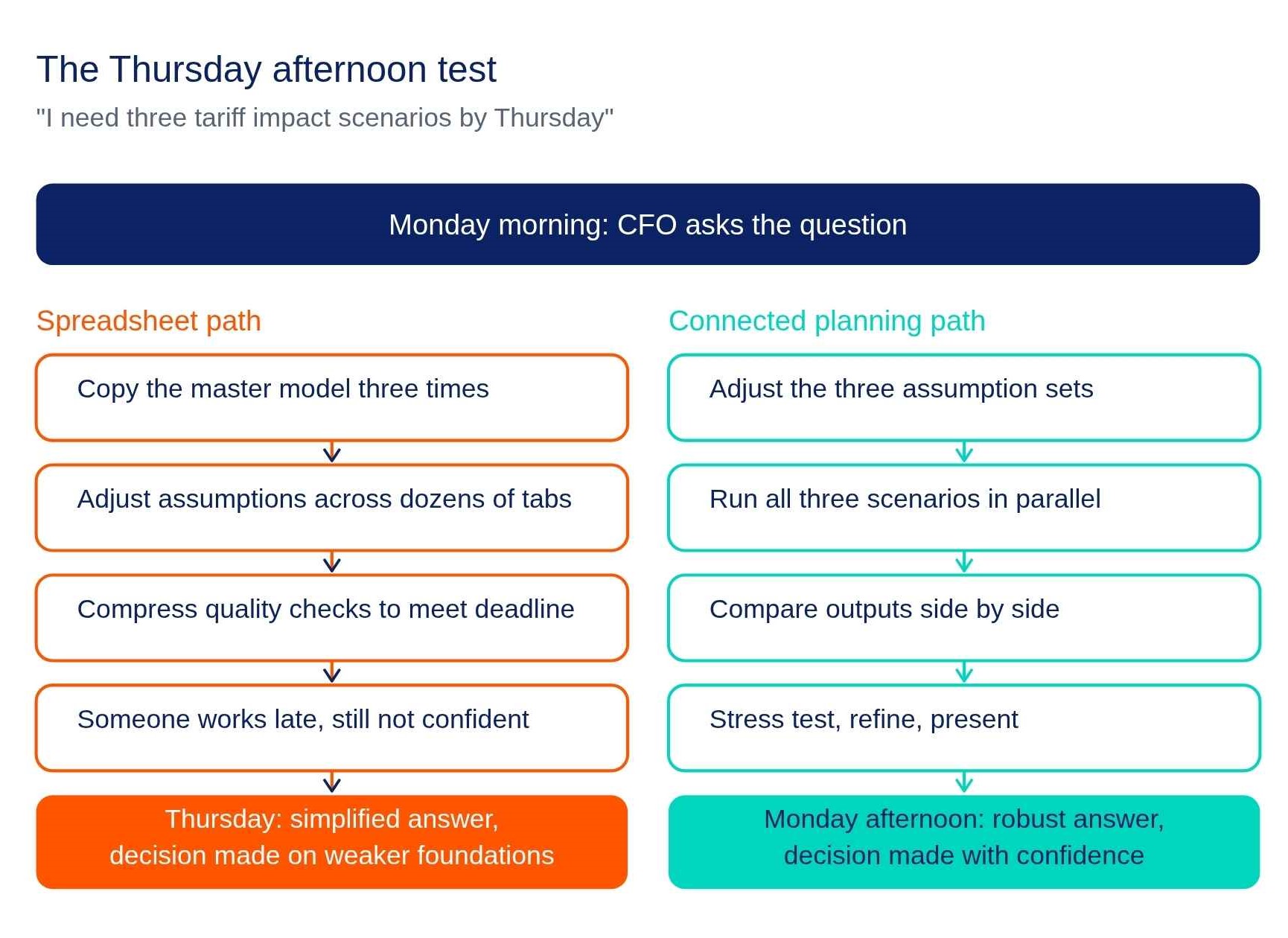
Here’s a scenario that will feel familiar. You need three tariff impact scenarios modelled by Thursday. In a connected planning environment, that’s a matter of hours: adjust the assumptions, run the scenarios, compare the outputs side by side.
In a spreadsheet environment, your team creates multiple copies of the model, each with slightly different assumptions adjusted manually across dozens of tabs. The risk of inconsistency is high. Quality checks get compressed to meet the deadline. Cells from a previous version might still carry old links. Someone will work late into the night to fit the request around their day job. And if a key person or file isn’t accessible, the whole exercise stalls.
The result is often a simplified analysis delivered just in time. You get something, but not the robust answer you needed. The decision gets made anyway, on weaker foundations than anyone would like. Your team knows this. They feel it more acutely than you do, because they’re the ones who stayed late and still weren’t confident in the output.
What your team has been doing to hold it together
It’s worth recognising the ingenuity that’s keeping things running. Your finance team has developed an impressive set of workarounds to extend Excel’s useful life: linked spreadsheets to connect departmental models, locked cells to prevent accidental overwrites, macros to automate repetitive steps, naming conventions to manage version control. These aren’t signs of a team that’s given up. They’re signs of a team that’s resourceful, committed, and working hard within constraints they didn’t choose.
Some of these workarounds genuinely help. But each one introduces its own fragility. Linked spreadsheets create dependency chains that break when someone moves a file. Macros are powerful but brittle. And when the version naming convention includes “vFinal”, “vFinal2”, and “vFinal_CFO_edits_USE_THIS_ONE”, the underlying control issue hasn’t been solved. It’s been given a more creative label.
Your team deserves credit for getting this far with these tools. The question is whether you’re asking them to keep running a race with a handicap they can’t overcome, no matter how hard they try.
What the ceiling actually costs you
The cost of the Excel ceiling isn’t measured in broken spreadsheets. It’s measured in the decisions you didn’t make quickly enough, the scenarios you didn’t model because the effort was too great, and the board conversations where you found yourself defending the number rather than discussing what to do about it.
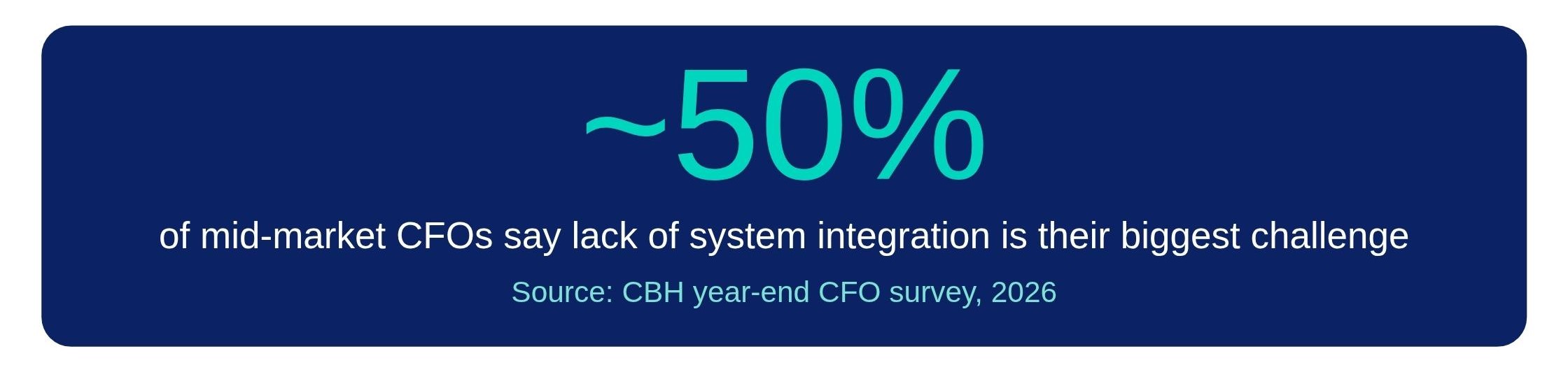
A recent CFO survey found that nearly 50% of mid-market CFOs identified a lack of system integration as their company’s biggest challenge. That finding won’t surprise anyone who’s ever sat in a planning review and realised the conversation has spent more time on data integrity than on strategy.
The Excel ceiling is the second dimension of the confidence gap. Blog post 1 in this series explored why forecasts go wrong structurally. This piece is about the tool constraint underneath that structure. Your team isn’t the limitation. The platform is. And the longer the ceiling holds, the wider the gap grows between the speed your business needs to decide and the speed your planning function can deliver.
The spreadsheet got you here. That’s worth acknowledging. But the cost of staying is now higher than the cost of moving.
What to read and do next
Take the Confidence Grader — a 3-minute diagnostic that scores whether your planning tools are keeping pace with your business. Take the Confidence Grader → Or download the insight paper: Closing the Confidence Gap, Download the insight paper → Next in the series: The planning gap no one talks about – why mid-market businesses are more exposed than they think..
Get in touch to discuss how to identify why your forecast is going wrong.
Darren Crooks is a consultant at Bedford Consulting, contributing to finance planning initiatives and thought leadership across the business. He works closely with internal teams to develop content and insights that reflect real customer challenges, helping organisations better understand and improve their planning processes. With a focus on clarity and practical value, Darren supports Bedford’s approach to delivering insight‑led, outcome‑driven planning solutions.